
 |
RTPA is an easy-to-use software utility that shows
programmers what really happens in any RPG program. RTPA turns any RPG source code
into "audit-enabled" program objects (using the regular OS/400 compiler).
When an audit-enabled program object is executed, it behaves exactly like its
non-enabled original, except that it records every action it takes (source statements
and variable values) in an audit file while it executes. |
 |
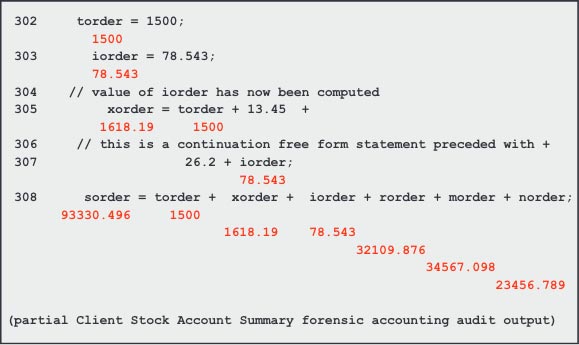
Real-Time Program Audits allow programmers to see, in real time, the
source statements, record formats, data field contents, keys, key lists and indicators
used in any program. Without setting breakpoints or having to intervene in the program's
execution in any way. RTPA is the easiest, hands-off way to see everything that's
happening in your source code.
RTPA doesn't require special test systems,
debugging environments or links to the source code. RTPA puts the auditing capability into
the program object itself, so it can be put onto any system and create an audit file without
any extra work.
|
|
• |
Supports OS/400 V4R5 and later |
 |
|
• |
Works with RPGIII and RPGIV | |
The program audit information gives programmers a prompt understanding of what
actually happened when a program executed. RTPA eliminates guesswork when figuring out what a
program does, when finding bugs and when testing new software. RTPA saves programmers hours of
time, simplifying the analysis of legacy programs, eliminating wasted energy during debugging
and helping to improve software reliability.
|
|
• |
Supports OS/400 V4R5 and later |
 |
|
• |
Works with RPGIII and RPGIV | |
Get up to speed on legacy software faster. Unravel spaghetti code, see program flow and identify
key program units in a flash. Eliminate the frustration of guessing about a legacy program's
execution and save days of effort.
|
|
• |
Legacy Programs |
|
• |
Third-Party Application Integratiion and Enhancement |
|
• |
New Programs |
 |
|
• |
Feature Enhancements | |
Find bugs in no time. Zoom in on the point of failure by any data point, or audit-enable your
programs and ignore them until a bug occurs. Finding bugs has never been easier!
|
|
• |
Intermittent Problems |
 |
|
• |
Environment Issues | |
Ensure the quality of all inputs, outputs and logic in new programs. Stop wasting hours working
through the logic only to discover that the test input data file was corrupt.
|
|
• |
Start and stop auditing based on program conditions |
|
• |
Include comments |
 |
|
• |
Audit false conditionals | |
|
 |